

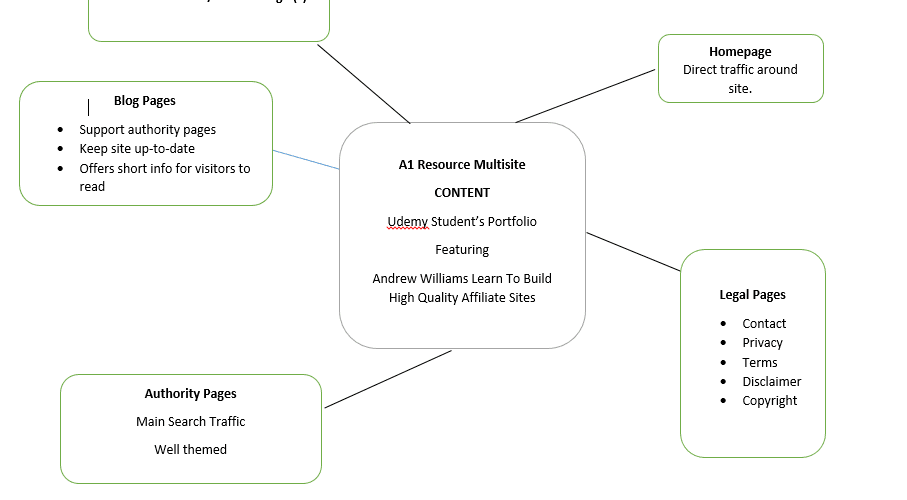


Andrew Williams recommends students create a web content mindmap to formulate an idea of the site we are striving to create.
Below is my example as I followed along replicating the exercise using Word*.
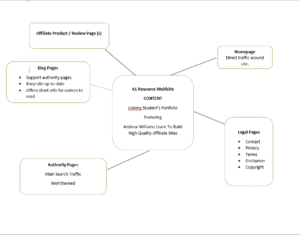
*For a quick introduction on how to use Word to create a simple mind map, do a Google search for “How do I make a flowchart in Word?”
Once the flowchart is created, if quality is not critical, make a print screen (Alt + ⎙ PrtScr). Paste it into another page in Word. Right-click on the pasted print screen area and select,”Save as Picture”, (filename). Choose an extension (.png or .jpg ), i.e., A1site.png.
Or, paste the print screen directly into your favorite photo editor (Paint). Use a photo editor (Paint, Photoshop or other), to crop the mindmap. In WordPress, place your cursor where you would like the mindmap. Select “Add Media” and upload the file to add it to your post.

One thought on “Create a Mindmap”
Like the site, seems like a lot work.